
When small business owners first discover artificial intelligence tools, they usually ask one central question: What can AI do when building a website?
Here's the honest truth:
AI is no longer just a gimmick that generates lorem ipsum text. Today, an advanced AI website builder acts like an entire digital agency in your pocket—drafting copy, structuring site maps, organizing local search parameters, and assembling responsive mobile layouts in seconds.
However, relying on generic site generators often leaves you with broken forms, fake reviews, and bland templates that look identical to every competitor in town.
That is precisely why BoltWeb operates on a completely higher tier.
Instead of generating uninspired layouts, BoltWeb utilizes advanced built-in intelligence that analyzes industry-specific user search behavior, local conversion paths, and proven design structures before writing a single line of code. It acts as a full-service platform for contractors, auto repair shops, salons, and local service providers, ensuring your digital storefront ranks high on search engines and turns casual visits into paying clients.
Here is the complete breakdown of what AI can automate, where human oversight is essential, and how to leverage an AI website builder to launch a high-converting website fast.
1. How Much of a Website Can AI Build for You?
Can an AI website builder construct 100% of your website automatically?
The short answer: It can handle roughly 80% to 90% of the heavy lifting instantly, leaving you to supply the remaining authentic business facts, custom domain connections, and final review.
An intelligent AI website builder automates time-consuming tasks that used to take web design agencies weeks to complete:
- Structure & Architecture: Generating logical page hierarchies, service hubs, and navigation menus.
- Persuasive Copywriting: Writing headlines, value propositions, service breakdowns, and calls to action.
- Responsive UI Layouts: Arranging high-contrast hero sections, trust badges, and mobile-friendly grids.
- Local Search Foundations: Configuring meta titles, page headings, and schema tags behind the scenes.
When you use a top-tier best AI website builder, you skip the frustrating blank-canvas stage entirely and jump straight to a production-ready draft that only needs your real business details before going live.
2. Turn a Rough Business Idea Into a Website Plan
Starting a web project from scratch is intimidating when you don't know which pages your business actually needs.
Should a roofing contractor combine leak repairs and full replacements on one page? Does a salon need separate pages for haircuts and coloring?
An AI website builder solves this cognitive overload instantly through automated AI website planning:
- Audience Profiling: Analyzing your target market's primary worries and intent.
- Sitemap Generation: Mapping out dedicated service pages, about profile hubs, and contact portals.
- Section Blueprinting: Defining the ideal reading order on your homepage to guide visitors toward booking.
Using an AI website builder for small business ensures your website structure mirrors real customer decision-making, lowering friction and encouraging immediate inquiries.
3. Generate a First Draft Without Starting From a Blank Page
Staring at a blank screen while trying to choose color schemes, font sizes, and layout grids drains your productive energy.
With an AI website generator, you input your business name, core services, and target location—and watch an entire multi-page site assemble in real time.
Modern AI website design engines handle visual composition automatically:
- Grid Alignment: Placing text, buttons, and visual media in balanced, readable formations.
- Visual Hierarchy: Setting bold headline scales that draw immediate attention to your core value proposition.
- Device Responsiveness: Adjusting section padding dynamically so layouts render crisp on desktop screens and mobile touchscreens.
Using an AI website builder eliminates hours of manual drag-and-drop tweaks, delivering a polished baseline in seconds.

4. Write Website Copy When You Don't Know What to Say
For most business owners, writing homepage text, service descriptions, and company bios is the hardest part of building a website.
When you sit down to write, you either get stuck facing writer's block or end up typing generic corporate filler like "we offer unmatched quality and great customer service."
An AI website content generator transforms your raw business facts into persuasive, conversion-focused copy:
Instead of bland placeholders, an AI website copywriting system crafts sharp, Benefit-Driven headlines:
- Before AI: "Welcome to Apex Roofing. We do good work for fair prices."
- After AI: "Fast, Reliable Emergency Roof Repair in Dallas. We Fix Leaks Within 24 Hours—Backed by a 10-Year Guarantee."
Using an AI website builder to draft your core messaging guarantees your copy speaks directly to your customers' needs.

5. Create Images and Choose Visuals That Fit Your Business
High-resolution visual assets make or break a website's credibility. But what if you don't have professional photography for every single service section yet?
An AI image generator for websites bridges this gap during the initial build phase:
- Contextual Image Selection: Generating or suggesting relevant visual placeholders for specific trades.
- Visual Proof Management: Structuring clean image grids designed specifically for before-and-after project comparisons.
- Asset Processing: Compressing image files automatically to ensure lightning-fast page loading over mobile networks.
While an AI website builder supplies clean visual placeholders, replacing them with authentic photos of your actual team, branded trucks, and real job sites creates undeniable trust that converts hesitant browsers into paying clients.

6. Adapt Your Website to Your Brand Instead of a Generic Template
One-size-fits-all templates force your unique business to look like thousands of other sites on the internet.
An intelligent AI website builder adapts its visual engine around your exact brand preferences using advanced AI web design tools:
- Brand Color Matching: Integrating your exact hex codes across buttons, background accents, and icons.
- Typography Pairing: Selecting clean, legible font combinations that match your industry's visual tone.
- Layout Density: Adjusting spacing between elements—offering spacious layouts for high-end services or compact, data-rich layouts for technical trades.
- • Industrial Trades ➔ Bold high-contrast colors, prominent phone CTAs
- • Health & Salons ➔ Clean minimalist layouts, soft tones, fast booking
- • Emergency Services ➔ Sticky mobile headers, emergency dispatch forms
Using a flexible AI website builder ensures your online presence reflects your physical brand identity without looking like a mass-produced template.
7. Make Website Changes Without Rebuilding Every Page
Your business is constantly evolving. You introduce new seasonal services, expand your coverage zip codes, or adjust hourly service rates.
Having to rebuild your entire website or call an expensive developer just to update a phone number or paragraph wastes time and money.
Using a modern AI website editor, site management becomes effortless:
- Prompt-Based Revisions: Updating headlines or changing call-to-action text by giving simple text instructions.
- Section Swapping: Adding new service blocks or customer review sections without breaking surrounding page elements.
- Isolated Editing: Refining a specific hero section while keeping the rest of your layout locked and intact.
An AI website builder acts as an ongoing digital assistant, giving you full operational control over your site 24/7.
8. Prepare Your Website for Search Engines With AI Assistance
Building a beautiful website is completely useless if local property owners cannot find your business on Google.
An AI website SEO engine handles technical search optimization during the initial generation process:
- Targeted Meta Titles & Descriptions: Writing custom page tags embedded with high-intent local keywords.
- Structured Heading Logic: Organizing content under proper H1, H2, and H3 tags for search engine crawlers.
- Image Alt Text: Generating descriptive text for visual assets to improve accessibility and image search indexing.
While search engine indexing and organic rankings depend on ongoing local search signals, an AI website builder sets up clean, search-ready site code from day one. You can inspect technical crawling rules via Google Search Central, learn about structured markup at Schema.org, check mobile usability guidelines at web.dev, analyze digital accessibility via W3C Web Accessibility Initiative, or review digital privacy best practices on the Federal Trade Commission (FTC).
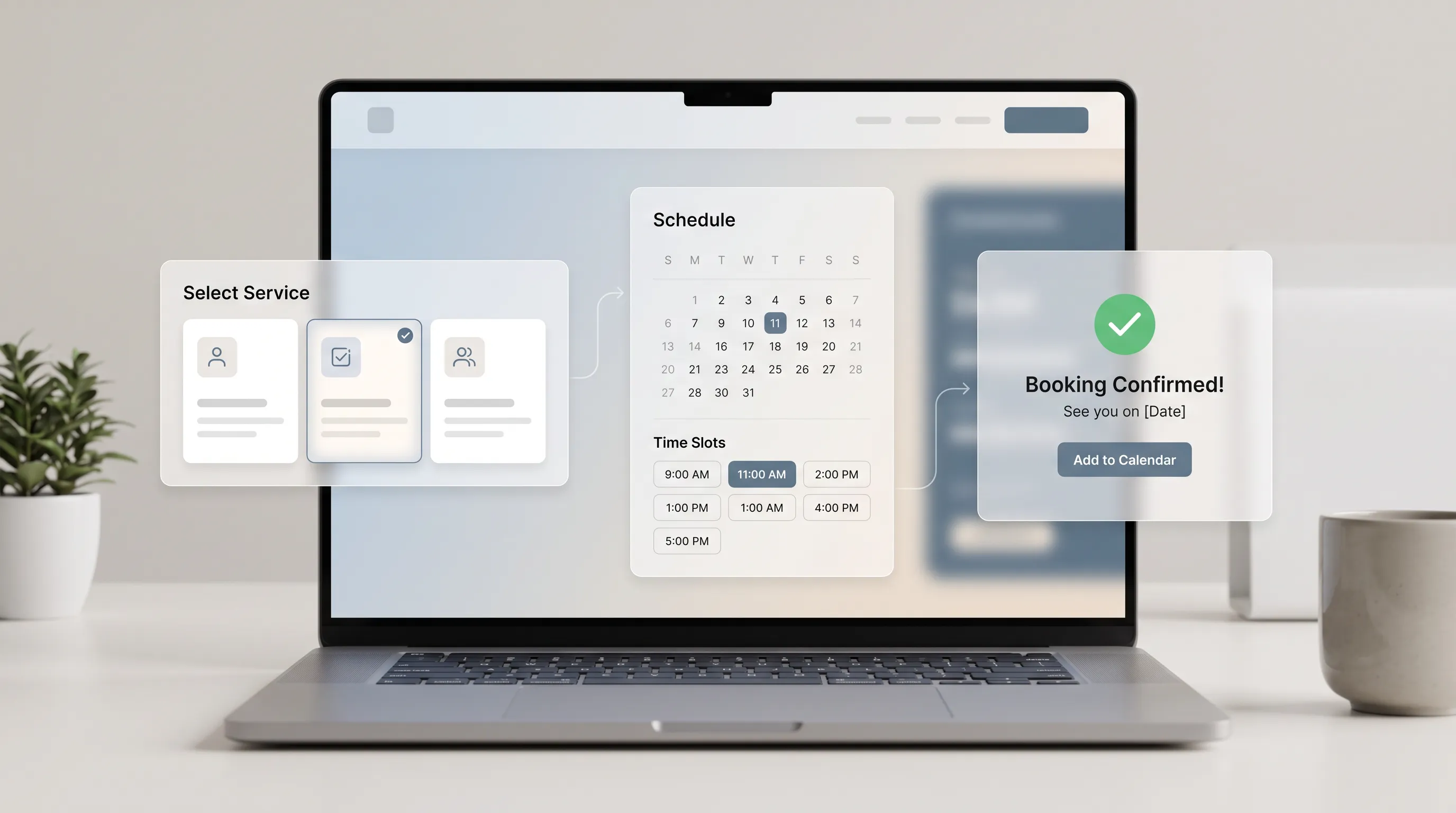
9. Add Contact Forms, Bookings, Payments, and Other Business Features
A website should be an active sales channel that processes inquiries and captures appointments around the clock.
An AI website builder generates functional interface elements tailored to your primary business goal:
- Lead Capture Forms: Configuring short, thumb-friendly intake forms using an AI website builder with forms.
- Appointment Booking Systems: Integrating real-time calendar flows via an AI website builder with booking.
- Secure Payment Checkouts: Enabling instant online deposit collection using an AI website builder with payments.
- • Interactive Estimate Forms
- • Smartphone Photo Uploads
- • Instant Dispatch Alerts
- • Live Calendar Reservations
- • Automated SMS Reminders
- • Online Deposit Processing
Connecting interactive business features directly within an AI website builder turns casual traffic into structured lead notifications delivered straight to your phone.
10. Find Errors Before Your Website Goes Live
Launching a website with broken contact buttons, missing image links, or unreadable mobile text damages your brand reputation.
AI automated testing assists with AI website development quality control before your public launch:
- Copy & Grammar Scanning: Flagging typos, awkward phrasing, or missing business details across all subpages.
- Link Verification: Checking that internal navigation buttons and tap-to-call headers link to valid endpoints.
- Mobile Viewport Review: Inspecting element scaling to prevent text overlap on smaller touchscreens.
Utilizing automated checks within an AI website builder minimizes launch mistakes, ensuring your digital storefront makes a flawless first impression.
11. Know What AI Can Get Wrong—and What You Must Check
While artificial intelligence is incredibly powerful, relying on unverified output without human review creates serious risk.
Understanding AI website builder limitations prevents embarrassing errors on your published site:
- Fictional Data: AI may invent placeholder prices or license numbers if you don't supply real ones.
- Generic Phrasing: Without explicit instructions, AI copy can drift back into generic corporate jargon.
- Missing Field Proof: AI cannot generate authentic photos of your real team, branded trucks, or physical store.
Always review AI-generated website content to verify that phone numbers, addresses, license credentials, and pricing policies are 100% accurate before taking your site live.
12. Publish and Maintain a Website That Works for Your Business
Building your website draft is only the first step. Taking your site live and keeping it optimized for long-term lead generation requires a clear launch strategy.
Follow this final launch checklist when using an AI website builder:
- Verify Factual Accuracy: Double-check business name, phone numbers, physical address, and operating hours.
- Connect Your Custom Domain: Link your official web domain so search engines index your brand address cleanly.
- Test Interactive Pathways: Submit test form inquiries and verify that tap-to-call mobile headers dial your office line.
- Monitor Lead Alerts: Confirm incoming quote requests route directly to your smartphone or email inbox without delay.
Ready to deploy a high-converting digital storefront that drives real local sales? Build and launch your high-converting website with BoltWeb today.
Faq What Can AI Do When Building a Website
1. Can an AI website builder create my entire site, or will I still have to do all the work?
Here’s the honest truth:
An AI website builder handles about 85% to 90% of the heavy lifting instantly. It writes your page copy, generates responsive mobile layouts, organizes your service navigation, and sets up your local SEO code. You simply supply your basic business facts, upload authentic field photos, and review the final draft before taking your site live.
2. How does an AI website builder write copy if it doesn't know my exact business details?
Think about this:
When you input your company name, core offerings, and service territory, an AI website content generator analyzes your specific industry to craft sharp, benefit-driven headlines. Instead of giving you bland corporate filler, it writes persuasive text aimed directly at solving your customers' biggest headaches.
3. Will my site look like a cheap template that hundreds of my competitors are already using?
Let’s face it:
Generic template generators spit out cookie-cutter pages that look identical to everyone else. But an advanced platform like BoltWeb operates on a completely higher level. It customizes typography, color hex codes, section padding, and visual hierarchy around your unique brand identity, ensuring your digital storefront stands out from local rivals.
4. Can an AI website builder set up my local SEO so nearby customers actually find me on Google?
Yes, absolutely.
And doing this right from day one is critical for driving organic calls. An AI website SEO engine automatically structures page headings, writes location-targeted meta titles, formats meta descriptions, and builds clean sitemap code behind the scenes. This signals your exact coverage zone to search engines without requiring you to hire an expensive digital marketing agency.
5. What happens if I want to update my prices, add a new service, or change my phone number later?
Here’s the good news:
You don't need to call a developer or touch a single line of code. Using an intuitive AI website editor, you can make instant updates directly through simple text prompts or a drag-and-drop interface. Whether you need to post seasonal discounts or expand your service zip codes, you can publish changes from your phone or laptop in seconds.
6. Can an AI website builder handle online appointment booking and customer lead forms?
You bet.
A static website that only displays text is just an expensive digital brochure. By utilizing an AI website builder with booking and an AI website builder with forms, your site automatically embeds short quote intake forms and interactive calendar tools. This allows prospective clients to request estimates or reserve service slots around the clock.
7. How does AI help me choose images if I don't have professional photography yet?
Want to know a secret?
You don't need a $2,000 photo shoot just to get started. An AI image generator for websites selects or creates clean visual placeholders tailored to your specific trade during the initial build phase. Once your initial layout is generated, you can easily swap in authentic photos of your actual team, branded trucks, and completed jobs to build undeniable trust.
8. Will my AI-generated website work properly on mobile phones and touchscreens?
Over 70% of local service searches happen on smartphones while customers are actively dealing with an urgent problem.
If your site is slow or hard to navigate on mobile, you lose money instantly. Modern AI website design engines automatically construct fully responsive layouts. Your text sizes, image grids, and tap-to-call phone buttons adapt dynamically to fit any mobile screen perfectly.
9. Can I accept online payments or credit card deposits using an AI website builder?
Yes, without any technical headaches.
When you build your site using an AI website builder with payments, you can connect secure checkout portals directly to your service pages. This enables you to collect upfront consultation fees, job deposits, or invoice payments seamlessly without sending manual payment links back and forth.
10. How do I stop AI from making up fake prices, fake reviews, or wrong license numbers?
Here is the fix:
AI tools only invent data when they lack strict guardrails. Platforms like BoltWeb follow strict factual boundaries, meaning the builder relies strictly on the facts, licenses, and reviews you provide. If information is missing, it leaves clean placeholders for your manual review rather than fabricating inaccurate claims.
11. How fast can I actually launch a professional site using an AI website builder?
Forget waiting six to eight weeks for a web agency to complete a simple layout.
With BoltWeb, intelligent built-in AI structures your multi-page layout, drafts high-converting copy, and configures your local SEO foundation in minutes. You simply review your details, connect your custom web domain, and start capturing local leads the very same day.
12. What happens when a customer submits an estimate form on my AI-built website?
In the local service industry, response speed is everything.
The moment a prospective client fills out an intake form on your site, instant alerts route straight to your smartphone or email inbox. This allows your team to call the lead back within minutes—locking in the job before local competitors even notice the inquiry.