
Every single phone call generated by your website represents an active, high-intent opportunity. When a prospective client taps your phone number or dials your business line, they are skipping the waiting game of email forms. They want immediate answers, custom estimates, or direct bookings. But if your analytics setup fails to record phone inquiries, you are operating your marketing campaigns completely blind.
Here is the plain truth: Counting pageviews and contact form submissions gives you only half the picture. If a client finds your storefront on a smartphone, taps your phone link, and books a $2,000 project over a 5-minute conversation, generic analytics reports mark that session as a drop-off. Measuring call interactions closes that blind spot so you can pinpoint exactly which landing pages and marketing channels drive real revenue.
Modern platforms make capturing these interactions effortless. When you build your online storefront on BoltWeb, connecting your contact channels is smooth right out of the box. As an all-in-one business website builder, BoltWeb builds click-to-call functionality directly into your header navigation, hero sections, and mobile layout blocks—helping you turn casual mobile visitors into live callers in under 60 seconds.
Here is your operational guide on how to track phone call conversions from your website, map click-to-call events, and measure actual revenue behind incoming calls.
1. How to Track Phone Call Conversions from Your Website
Let's address the central measurement challenge right away: A visitor clicking a phone number link on a screen is fundamentally different from a live caller having a conversation with your team. To track calls effectively, you need a setup that records both digital user behavior and actual phone line activity:
| User Action | Technical Tracking Engine |
|---|---|
| Taps link on smartphone | Click-to-call event (GA4 / GTM) |
| Dials number off desktop | Dynamic Number Insertion (DNI) |
| Completes 3-minute sales call | Qualified Call Conversion / CRM Sync |
Mastering how to track phone call conversions from your website allows you to implement reliable website call tracking and set up accurate systems to track phone calls from website traffic seamlessly (build on the foundational Google Analytics setup walkthrough for small businesses).
2. Understand the Difference Between Phone Number Clicks and Completed Calls
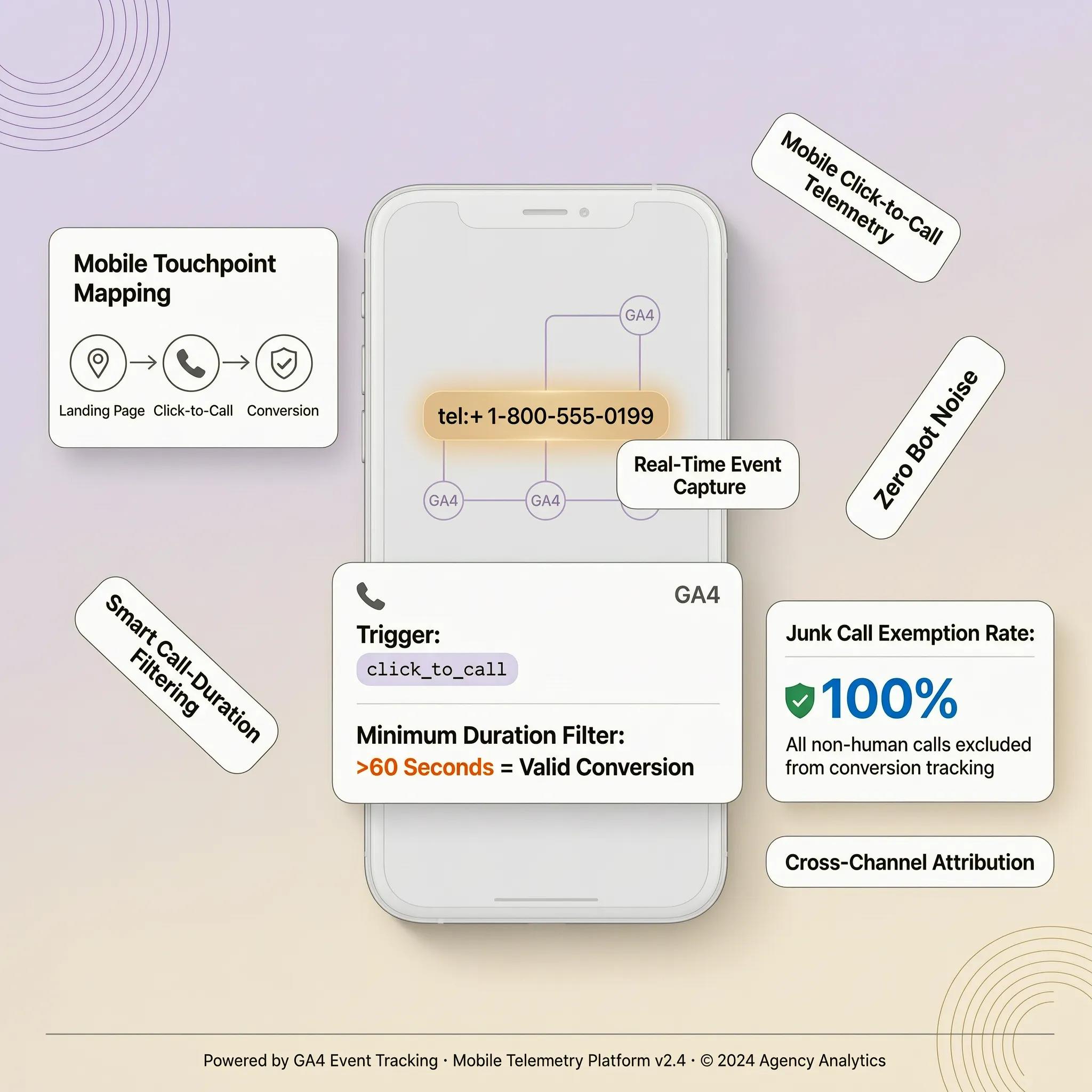
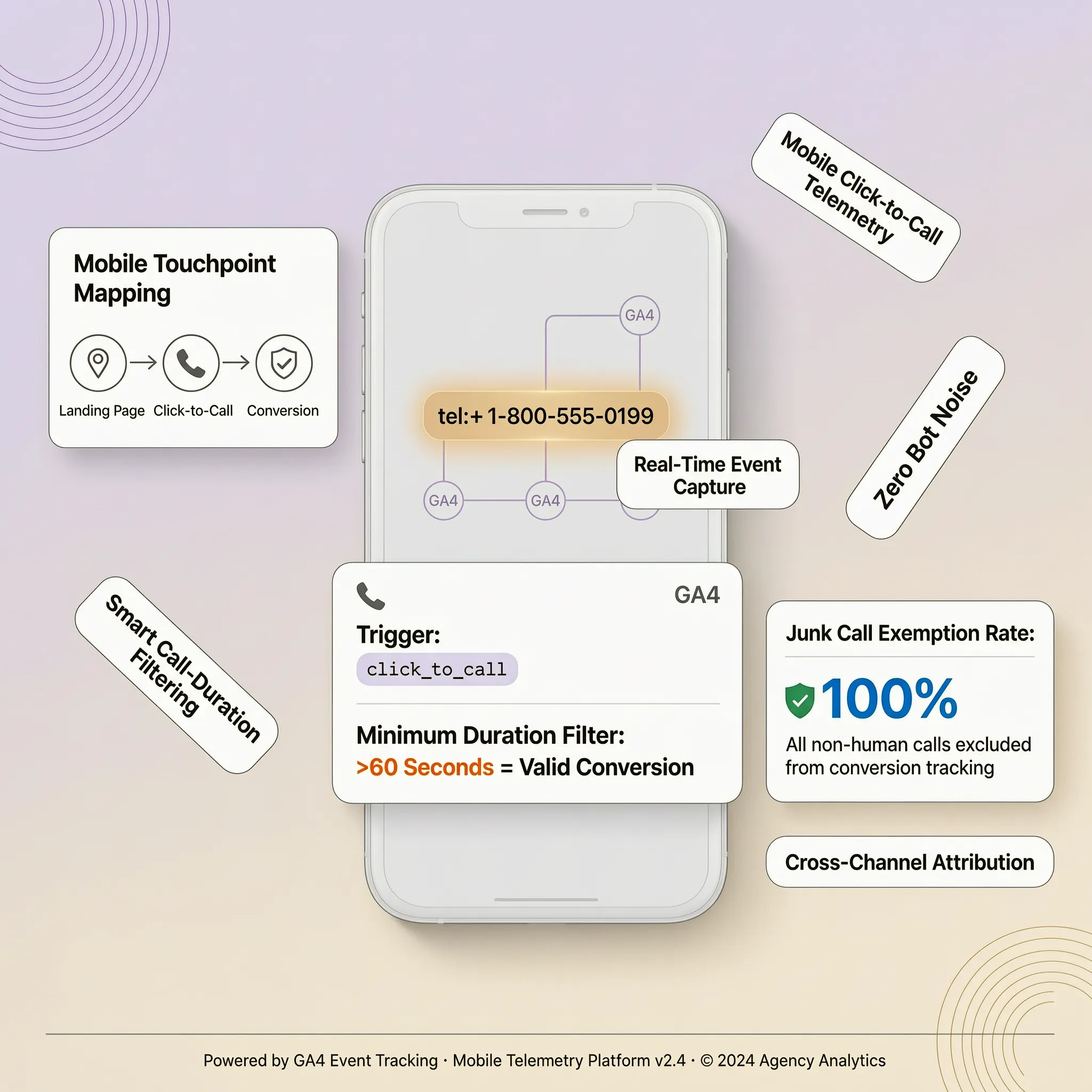
Here is a critical distinction every business owner must understand: A "click-to-call" event records when a visitor taps a telephone link (tel:18005550199) on your page. On mobile devices, this tap prompts the phone dialer app to open. However, the visitor might hang up before dialing, hit cancel, or experience a dropped connection. Understand the call tracking hierarchy:
- Initiated Click: The visitor taps your hyperlinked phone number.
- Connected Call: The dialer routes the call, and your office line rings.
- Qualified Call: The conversation lasts past a set time threshold (e.g., 60 seconds), indicating a genuine sales inquiry.
Learning how to track phone number clicks provides a strong starting indicator, while establishing robust website phone call tracking protocols yields precise phone call conversion tracking data (combine with our complete guide to tracking website conversions with GA4).
3. Choose the Right Phone Call Tracking Method for Your Business
Selecting the right tracking mechanism depends on your monthly call volume, marketing spend, and specific business model. Compare the primary methods available:
- GA4 Click-to-Call Events: Free, easy setup that tracks when visitors tap phone links across your site. Perfect for local service providers getting started.
- Google Ads Call Reporting: Built-in Google tool that assigns dynamic Google forwarding numbers to ad traffic to measure paid call conversions.
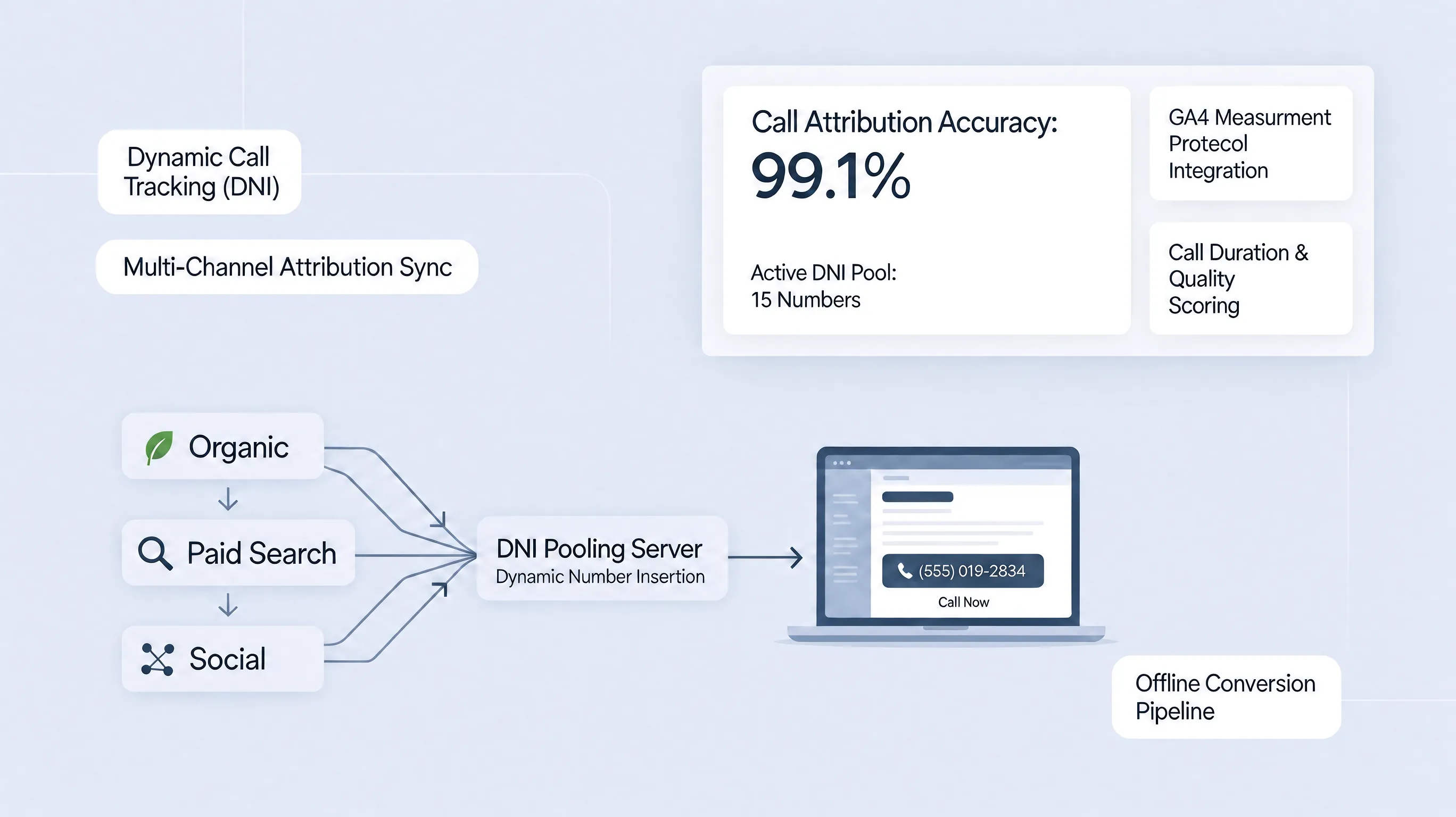
- Dynamic Number Insertion (DNI): Advanced platforms (like CallRail or WhatConverts) that swap phone numbers dynamically based on traffic sources to track individual caller sessions.
Evaluating these phone call tracking methods, testing dedicated call tracking software, and selecting optimized website call tracking tools matches your measurement to your operational needs (review related measurement in tracking contact form submissions in GA4).
4. Track Phone Number Clicks with Google Analytics 4
Out of the box, Google Analytics 4 tracks outbound link clicks using Enhanced Measurement. However, standard telephone links starting with tel: often need custom event rules to capture data cleanly. To track telephone clicks inside GA4:
- Ensure all telephone numbers on your site are wrapped in standard HTML link formats:
<a href="tel:18005550199">Call Us Now</a>. - Create a custom event rule or GTM trigger to log every
tel:link interaction cleanly into your analytics dashboard.
Click-to-Call Event Payload = Event Name (phone_click) + Parameters (page_location, link_url)
Setting up rules to track phone number clicks in GA4 establishes reliable GA4 phone click tracking to support long-term Google Analytics phone call tracking analysis.
5. Set Up Click-to-Call Event Tracking with Google Tag Manager
Google Tag Manager (GTM) gives you complete control to separate calls initiated from your top header navigation, main hero section, or footer contact block. Follow this simple GTM setup workflow:
- Create a Trigger: Go to Triggers → New → Just Links. Set the trigger to fire when Click URL starts with
tel:. - Configure the GA4 Tag: Go to Tags → New → Google Analytics: GA4 Event.
- Set Event Details: Set Event Name to
phone_number_clickand pass parameters likeclick_elementandpage_path. - Publish Tag: Test inside Preview Mode and publish your container.
tel: URLphone_number_click to GA4Mastering Google Tag Manager phone click tracking and implementing GTM tel link tracking lets you launch a targeted GA4 click-to-call event tag inside your BoltWeb visual workspace (review broader tracking patterns in our guide to tracking website button clicks in GA4).
6. Track Actual Phone Calls with a Call-Tracking Service
If your business relies heavily on high-ticket phone sales (such as legal services, home remodeling, or medical clinics), tracking link clicks alone isn't enough. You need to track the actual conversation. Call-tracking services utilize Dynamic Number Insertion (DNI):
- A small JavaScript snippet on your website detects where a visitor came from (e.g., Organic Search, Google Ads, Facebook Ad).
- The script dynamically swaps your static phone number with a unique tracking number assigned to that specific traffic source.
- When the customer dials, the service records the source, session details, call duration, and audio recording before forwarding the call to your primary office line.
Deploying dynamic number insertion via a managed call tracking service allows you to track incoming calls from website sessions with pinpoint accuracy.
7. Connect Website Call Tracking with Google Ads
If you spend money on pay-per-click advertising, linking call data to your ad budget is essential for calculating true campaign ROI. Google Ads offers two primary ways to track phone leads:
- Call Assets / Call-Only Ads: Allows mobile searchers to call directly from the ad snippet without visiting your website.
- Website Call Conversions: Uses Google forwarding numbers on your site to swap your business number and record calls generated after an ad click.
Configuring Google Ads website call conversions helps you track phone calls from Google Ads campaigns to evaluate your Google Ads call tracking performance.
8. Measure Calls from Different Pages, Campaigns, and Traffic Sources
Not all web pages generate calls at the same rate. A visitor reading a high-intent pricing page is far more likely to dial your office than someone reading a top-of-funnel educational blog post. Analyze incoming call data across key dimensions:
- Traffic Source / Medium: Compare calls coming from Google Organic, Local Map Packs, Direct Traffic, and Social Media (explore details in finding where website traffic comes from).
- Landing Page Performance: Identify which specific service pages prompt immediate phone contacts (see identifying your best performing website pages).
Learning how to track calls by traffic source inside your website call tracking analytics provides clear call attribution across all marketing campaigns (also see analyzing website traffic reports).
9. Identify Qualified Calls Instead of Counting Every Call as a Lead
Counting wrong numbers, vendor sales pitches, or 5-second dropped connections as real leads inflates your conversion metrics and misleads your strategy. Filter out low-quality calls using strict qualification parameters:
- Duration Thresholds: Set a minimum threshold (such as 60 or 90 seconds) before counting a call as a lead.
- Call Status Verification: Confirm the call was answered by a staff member rather than hitting voicemail.
- Interactive IVR / Tagging: Use automated call menus ("Press 1 for Sales") or post-call wrap-up tagging by your front-desk team.
Filtering for qualified phone leads ensures you track qualified calls to build an accurate phone call conversion tracking model.
10. Test Your Phone Call Tracking on Desktop and Mobile
Never launch a call-tracking setup without verifying its execution across multiple devices and browsers. Run through this quality assurance checklist:
Taking time to test phone call tracking, run an end-to-end test GA4 tel link events audit, and check mobile call tracking behavior prevents lost conversion data.
11. Fix Common Website Phone Call Tracking Problems
If your call reports reflect missing inquiries or duplicate counts, work through these common technical fixes:
- Broken HTML Markup: Ensure phone links use the correct syntax (href="tel:18005550199") without spaces or dashes inside the
tel:code. - GTM Trigger Overlap: If your event fires twice on a single tap, verify that you haven't deployed duplicate tags in both GTM and your site's header code.
- Script Blocking / Consent: Ensure tracking scripts comply with privacy preferences while capturing legitimate interactions (learn more in adding a cookie consent banner to your website).
Resolving website call tracking not working errors fixes GA4 phone tracking issues and eliminates duplicate phone click events fast.
12. Measure the Revenue and Business Results Behind Website Calls
Tracking phone clicks and call durations is valuable, but matching those calls to closed sales deals and bank deposits is what transforms your business. Connect call data directly to commercial outcomes:
- CRM System Sync: Connect your call-tracking platform (or form notifications) to your CRM to log caller IDs, sales values, and deal statuses.
- Pipeline Conversion Rate: Calculate how many phone inquiries turn into paid invoices.
Phone Call ROI = (Total Revenue generated from Phone Leads / Total Investment in Call Tracking & Marketing) × 100
Evaluating your phone call conversion rate, learning how to track calls and sales, and calculating your total call tracking ROI proves the true monetary value of your digital marketing efforts on BoltWeb (combine with tracking website sales and revenue).
Turn Phone Inquiries Into Daily Business Revenue
Setting up telephone tracking, configuring event triggers, and matching call data to real sales should never feel like a confusing technical chore. When you publish your storefront with BoltWeb, every element of your site is optimized for action from day one.
Whether you run a local contracting business, a professional advisory firm, or an emergency repair service, BoltWeb builds high-converting click-to-call layouts, formats crisp mobile headers, integrates analytics scripts, and launches a lead-generating storefront tailored to your target market.
Frequently Asked Questions: Measuring Phone Call Conversions in GA4
1. How do I track phone call conversions from my website so I can measure actual sales leads?
Tracking phone call conversions from your website measures when a visitor taps your hyperlinked phone number or dials a dynamic tracking number after exploring your storefront. Traffic volume alone won't pay your bills—a page receiving 10,000 passive clicks that yields zero phone inquiries is far less valuable than a targeted landing page bringing in 200 visitors and 20 paying clients. Setting up track phone call conversions from your website parameters gives you a clear website call tracking engine to track phone calls from website traffic seamlessly. When you build your storefront on BoltWeb, connecting your call analytics is completely integrated right out of the box. As an all-in-one business website builder, BoltWeb automatically builds click-to-call functionality and clean event tags into your mobile headers and hero sections in under 60 seconds!
2. What is the difference between phone number clicks, initiated calls, and completed phone leads?
Relying solely on raw click counts can inflate your conversion numbers because tapping a phone link doesn't guarantee the caller stayed on the line. Understand the call tracking hierarchy: Initiated Click: The visitor taps a hyperlinked phone number (tel:18005550199) on a mobile screen. Connected Call: The dialer routes the call, and your office phone actually rings. Qualified Call: The conversation lasts past a specific duration threshold (e.g., 60 seconds), confirming a genuine customer inquiry. Learning how to track phone number clicks provides a strong starting indicator, while establishing robust website phone call tracking protocols yields precise phone call conversion tracking data.
3. Which phone call tracking method is best for my small business website?
Selecting the right tracking mechanism depends directly on your monthly call volume, ad budget, and sales workflow. Compare the primary methods available: 1. GA4 Click-to-Call Events: A straightforward setup that tracks when mobile visitors tap phone links across your site. Perfect for local service businesses getting started. 2. Google Ads Call Reporting: A built-in Google tool that assigns dynamic forwarding numbers to ad traffic to measure paid search call leads. 3. Dynamic Number Insertion (DNI): Advanced call-tracking software that dynamically swaps phone numbers on your site based on visitor traffic sources. Evaluating these phone call tracking methods, testing dedicated call tracking software, and selecting optimized website call tracking tools matches your measurement strategy to operational needs (review baseline setup in the foundational Google Analytics setup walkthrough for small businesses).
4. How do I track phone number clicks using Google Analytics 4?
Out of the box, GA4 tracks outbound links, but standard telephone links starting with tel: often need custom event rules to capture data cleanly. Follow this setup path inside GA4: Format every telephone number on your site as a standard HTML link: <a href="tel:18005550199">Call Us Now</a>. Create a custom event rule or GTM trigger to record every tel: link interaction directly inside your analytics property. Setting up rules to track phone number clicks in GA4 establishes reliable GA4 phone click tracking to support long-term Google Analytics phone call tracking analysis (extend this with our guide to tracking website button clicks in GA4).
5. How do I set up click-to-call event tracking with Google Tag Manager?
Google Tag Manager gives you precise control to separate calls initiated from your header navigation, main hero block, or footer section. Follow this 4-step GTM setup workflow: Create a Link Trigger: Go to Triggers → New → Just Links. Set the trigger to fire when Click URL starts with tel:. Configure GA4 Event Tag: Go to Tags → New → Google Analytics: GA4 Event. Pass Event Parameters: Set the Event Name to phone_number_click and include parameters like click_location and page_path. Publish and Test: Confirm tag execution inside GTM Preview Mode before publishing your container. Mastering Google Tag Manager phone click tracking and implementing GTM tel link tracking lets you launch a targeted GA4 click-to-call event tag on BoltWeb.
6. How do dynamic number insertion (DNI) and call-tracking services work?
If your business relies heavily on high-ticket phone inquiries—such as legal services, home contracting, or medical practices—tracking link clicks alone isn't enough; you need to track the actual phone call. Call-tracking services utilize Dynamic Number Insertion (DNI): A lightweight JavaScript snippet detects where a visitor originated (e.g., Organic Search, Google Ads, Social Media). The script dynamically swaps your static phone number with a unique tracking number assigned to that traffic channel. When the prospect dials, the system logs the source, call duration, and audio recording before routing the caller to your office line. Deploying dynamic number insertion via a managed call tracking service allows you to track incoming calls from website sessions with complete accuracy (review related tracking in our complete guide to tracking website conversions with GA4).
7. How do I track phone calls from Google Ads website campaigns?
If you invest money in pay-per-click advertising, connecting phone call data directly to your ad spend is critical for calculating true campaign ROI. Google Ads offers two primary ways to capture call leads: Call Assets / Call-Only Ads: Enables mobile searchers to dial your business directly from the ad snippet without visiting your website. Website Call Conversions: Uses Google forwarding numbers on your site to swap your business number and log calls generated after an ad click. Configuring Google Ads website call conversions helps you track phone calls from Google Ads campaigns to evaluate your Google Ads call tracking efficiency.
8. How do I measure which website pages and traffic sources drive the most phone calls?
Not all website pages generate phone inquiries at the same rate. A visitor reviewing a detailed pricing page is far more likely to call than someone reading a top-of-funnel blog post. Analyze incoming call volume across two primary dimensions: Traffic Source / Medium: Compare call volume originating from Google Organic, Google Maps, Social Media, and Direct visits (learn details in finding where website traffic comes from). Landing Page Performance: Pinpoint which specific service pages prompt immediate phone contacts (see identifying your best performing website pages). Learning how to track calls by traffic source inside your website call tracking analytics provides clear call attribution across all marketing channels (combine with analyzing website traffic reports).
9. How do I identify qualified calls instead of counting every phone call as a lead?
Counting wrong numbers, vendor sales pitches, or 5-second dropped connections as real leads inflates your conversion metrics and skews your marketing strategy. Filter out low-quality calls using strict qualification rules: Duration Thresholds: Set a minimum conversation length (such as 60 or 90 seconds) before logging a call as a key conversion event. Answer Status Verification: Confirm the call was answered by a team member rather than hitting voicemail. Post-Call Tagging: Use automated call menus or post-call wrap-up tagging by your team to log lead quality. Filtering for qualified phone leads ensures you track qualified calls to build an accurate phone call conversion tracking model.
10. How do I test phone call tracking on mobile and desktop devices?
Never launch a call-tracking configuration without verifying its execution across multiple browsers and device types. Run through this quality assurance test checklist: Mobile Touch Test: Open your storefront on a smartphone, tap your phone button, and verify the dialer opens with the correct number. Desktop Visual Inspection: Open your page on a desktop browser to confirm the phone number displays clearly as readable text and a clickable link. Dynamic Number Replacement: If using DNI, visit your site using a test UTM link (?utm_source=test) to confirm the display number updates automatically. Realtime Analytics Audit: Confirm that tapping the phone link fires a live event inside GA4 DebugView. Taking time to test phone call tracking, run an end-to-end test GA4 tel link events audit, and inspect mobile call tracking behavior prevents lost conversion metrics.
11. How do I fix common website phone call tracking issues like missing or duplicate call events?
If your call reports reflect missing inquiries or duplicate counts, work through these common technical fixes: Fix Broken HTML Syntax: Ensure phone links use the correct syntax (href="tel:18005550199") without spaces or dashes inside the tel: code string. Eliminate GTM Trigger Overlap: If your event fires twice on a single tap, verify that you haven't deployed duplicate tags in both GTM and your site's header code. Verify Consent & Privacy: Ensure tracking scripts comply with privacy preferences while capturing legitimate interactions (learn more in adding a cookie consent banner to your website). Resolving website call tracking not working errors fixes GA4 phone tracking issues and eliminates duplicate phone click events fast.
12. How do I measure actual revenue and ROI from website phone call conversions?
Tracking phone clicks and call durations is valuable, but matching those calls to closed sales contracts and revenue deposits is what transforms your business. Connect call data directly to commercial outcomes: CRM Platform Integration: Link your call-tracking service to your CRM (like HubSpot or Salesforce) to log caller IDs, quoted estimates, and closed deal values. Calculate True Call ROI: Evaluate total revenue generated against overall marketing spend.
Phone Call ROI = (Total Revenue Generated from Phone Leads / Total Investment in Call Tracking & Marketing) × 100
Evaluating your phone call conversion rate, learning how to track calls and sales, and calculating your total call tracking ROI proves the true monetary value of your digital marketing efforts on BoltWeb (pair with tracking website sales and revenue).