Every extra step you make a customer take gives them a reason to walk away. When a client decides they want to work with you, they want to reserve a slot right then and there. If they have to fill out a general contact box, wait six hours for a reply, and exchange four emails just to find an open Tuesday, they will move on to a competitor who makes it instant.
So, how do you eliminate that drop-off?
Learning how to add a booking form to a website starts by embedding an active reservation widget directly into your main layout. Placing a self-service schedule block inside your site allows visitors to lock in dates without leaving the page.
A well-configured website booking form acts as your automated receptionist. It handles reservation intake, collects essential details, and updates your master calendar in real time. If you're establishing a new digital presence, check out our guide on building a business website to lay the groundwork.

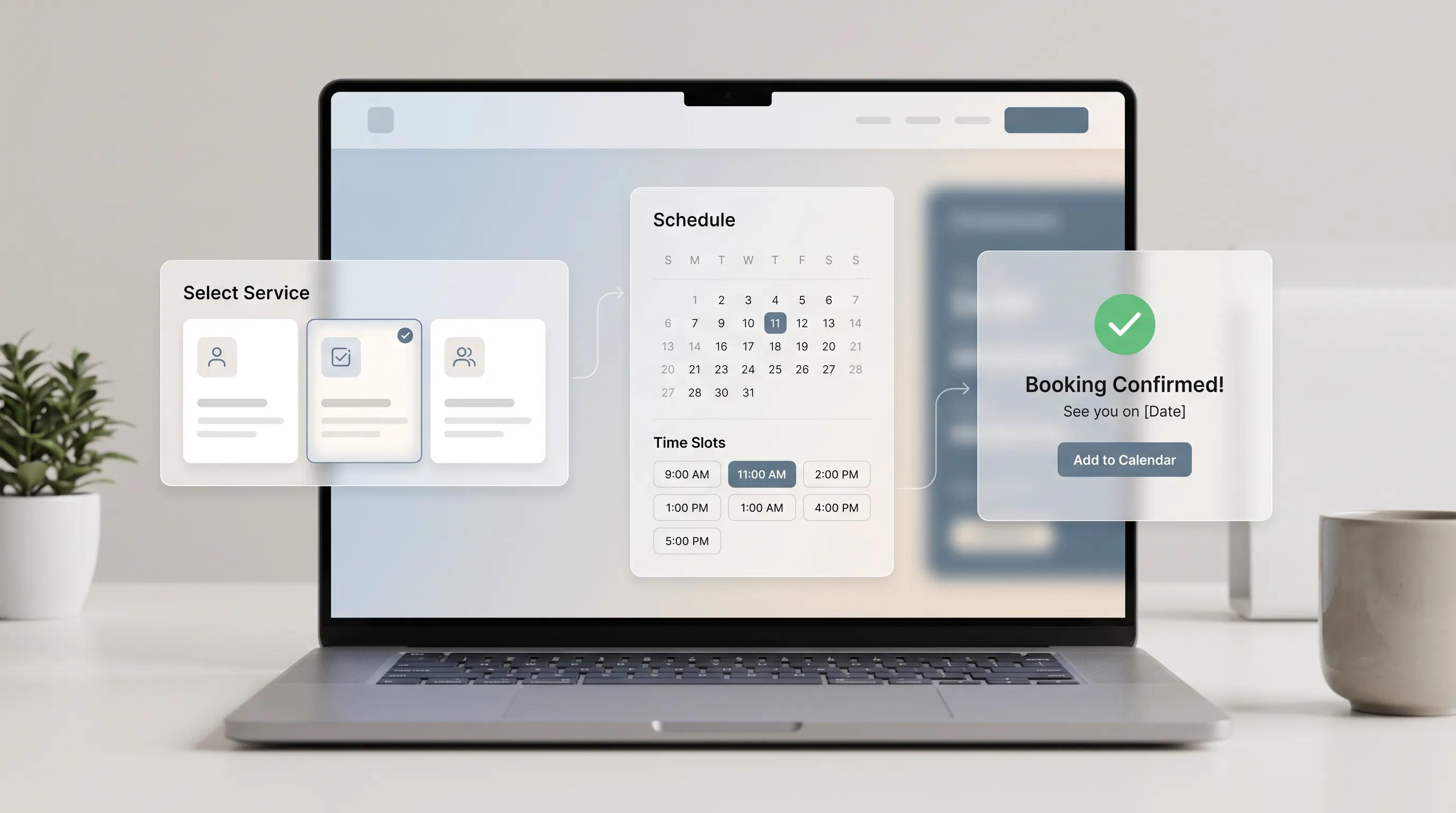
THE INSTANT BOOKING PIPELINE
│
▼
[ HIGH INTENT ]
Selects target service
Zero email delay
[ INLINE CALENDAR ]
Sees real-time openings
1-click time selection
[ SECURED BOOKING ]
Confirmation & invite
Auto-reminders active
Decide What Customers Should Be Able to Book
Before dropping a calendar widget onto your web page, ask yourself one foundational question:
What specific outcome is the client reserving?
When a booking form presents a confusing list of options, decision fatigue sets in. If a visitor has to guess whether they need a "Strategy Alignment Session" or a "Discovery Consultation," they stall out.
Keep your service choices clear and structured:
- Define distinct service offerings: Clearly separate consultation types by duration, scope, and price (e.g., "30-Min Free Initial Audit" vs. "90-Min Full Site Inspection").
- Assign fixed time durations: Allocate realistic time slots that include built-in buffer buffers between appointments.
- Specify location formats: State clearly whether the session takes place via video call, phone call, or on-site visit.
Clear service definitions build immediate customer confidence. When visitors know exactly what they are selecting, they proceed through your online booking interface without hesitation.

Show Available Dates and Times Clearly
Nobody wants to reach out just to ask, "When are you free next week?"
Forcing users to request a custom date range introduces massive friction. Applying Hick's Law, your job is to make choices obvious and simple without overwhelming the user with a wall of text.
Here is how to optimize your booking calendar display:
- Display real-time openings: Show open slots dynamically so clients never select an unavailable time.
- Auto-detect time zones: Ensure your appointment scheduling interface automatically adjusts time slots to match the visitor's local timezone.
- Limit visible time slots: Present a clean grid of 3 to 5 prime daily options instead of overwhelming users with dozens of tiny choices.
An intuitive online appointment booking interface makes selecting a time as effortless as tapping a button.
Ask Only for the Details You Need
Let's be completely practical here.
Why does a initial 15-minute consultation form need a home address, company tax ID, and three paragraphs of background history? It doesn't. Every extra field you add to an appointment form drops your completion rate significantly.
[ OVERCROWDED FORM (HIGH DROPOFF) ]
- Full Name
- Business Address
- Tax ID Number
- Annual Revenue
- Detailed History
──► Too much friction, high abandon
[ STREAMLINED FORM (HIGH CONVERSION) ]
- Full Name
- Email Address
- Phone Number (for SMS reminders)
- Short Note on Project Goal
──► Rapid submission, low friction
Apply strict necessity criteria to your booking form fields:
- Collect core contact data: Limit required fields to the client's name, email address, and phone number.
- Use smart radio buttons: Replace open text boxes with pre-set choices for primary consultation goals.
- Make intake optional: Allow clients to share extra context in an optional text field rather than making it mandatory.
Reducing intake friction keeps client momentum high from selection to final click. For similar strategies on general inquiries, read our guide on adding lead capture forms.

Make the Booking Button Clear and Actionable
The submission button is where hesitation peaks. But here is where so many sites fail:
Vague button text like "Submit," "Send," or "Proceed" creates doubt right when the client is about to commit. What happens next? They pause and second-guess the process.
Want higher conversions?
Upgrade your booking form CTA using specific, benefit-driven language:
- Use direct action verbs: Replace generic terms with concrete promises like "Confirm My 30-Minute Call" or "Reserve My Appointment Now."
- Reinforce risk reversal: Add a micro-copy note below the button such as "Free cancellation up to 24 hours before."
- Apply high visual contrast: Choose an action button color that stands out against your page background.
A direct book now button clarifies the outcome and removes final hesitation. Discover more tips in our article about CTA best practices.
[ GENERIC BUTTON TEXT (WEAK) ]
[ SUBMIT ]
──► Unclear outcome, transactional
[ SPECIFIC ACTION CTA (STRONG) ]
[ RESERVE MY APPOINTMENT NOW ]
──► Specific benefit, immediate value
Explain What Happens After Someone Books
Ever submitted a form only to be greeted by a blank screen?
It's frustrating. When a client submits a booking request, leaving them in the dark creates anxiety. They wonder: Did my reservation actually go through? Am I confirmed, or do I need to wait for an email?
Build an reassuring post-booking flow using clear booking confirmation signals:
- Display instant on-screen verification: Show a clear success screen confirming the date, time, and service selected.
- Provide immediate calendar invites: Add instant "Add to Google Calendar" and "Add to iCal" buttons right on the confirmation page.
- Set clear next steps: Detail what the client should prepare prior to the meeting.
[ UNCERTAIN CONFIRMATION (POOR) ]
Form resets to blank screen
──► User wonders if request failed
[ REASSURING CONFIRMATION (STRONG) ]
"You're booked for Tuesday, Oct 12 at 2 PM! We sent a calendar invite to your inbox. Click below to save it to your schedule."
──► Instant certainty, total trust
Clear feedback replaces doubt with confidence and ensures your client shows up prepared.

Make Your Booking Form Easy to Use on Mobile
Here is a fact you cannot ignore:
Over 60% of appointment reservations happen on mobile screens. If your mobile booking form requires pinch-zooming, features tiny calendar dates, or hides buttons off-screen, users will leave instantly.
MOBILE SCHEDULING CHECKLIST
- ✔ Touch-friendly calendar grids (minimum 48px target size)
- ✔ Single-column field layout to eliminate side-scrolling
- ✔ Native phone keypad triggers for contact fields
- ✔ Sticky submission bar pinned to screen bottom
Optimize your online booking layout for smaller touchscreens:
- Expand touch targets: Ensure date slots and time buttons are large enough for thumb taps.
- Use single-column layouts: Stack intake fields vertically to eliminate horizontal scrolling.
- Enable native keypads: Use standard HTML input tags (type="tel", type="email") so mobile devices display the right keyboard automatically.
A clean, touch-friendly setup allows prospective clients to book effortless appointments from anywhere. Read more in our usability guidelines.

Build Trust Before Asking Someone to Book
Why would someone reserve time on your calendar if they aren't convinced you are legitimate?
Scheduling an appointment requires a commitment of time and personal details. If your page lacks credibility indicators, prospective clients hesitate.
How do you establish instant authority on your trustworthy booking website?
- Position verified proof nearby: Display customer star ratings or brief review quotes right next to the calendar block.
- Show authentic team headshots: Let clients see who they will be speaking with during the consultation.
- Include clear cancellation policies: State your privacy terms and rescheduling guidelines directly below the form.
Strengthening website trust before asking for a time slot removes hesitation and drives consistent reservations. Learn how to integrate social proof through our guide on establishing credibility.

Connect Your Booking Form to Your Calendar
Imagine the nightmare of double-booking two high-value clients for the exact same hour.
Manual calendar updates lead to human error. If your website isn't connected directly to your schedule, you risk booking double appointments or taking calls during personal time.
AUTOMATED CALENDAR SYNC
│
▼
[ CLIENT RESERVATION ]
Selects open web slot
Instant database save
[ LIVE API SYNC ]
Syncs with Google/Outlook
Checks calendar conflicts
[ REAL-TIME BLOCK ]
Slot disappears from site
Prevents double-booking
Implement true online scheduling synchronization:
- Enable two-way calendar sync: Link your intake system directly with your Google Calendar, Outlook, or Apple Calendar.
- Set buffer intervals: Automatically add 15-minute preparation buffers before and after every appointment.
- Enforce minimum lead times: Prevent last-minute surprises by requiring clients to book at least 12 or 24 hours in advance.
Automated calendar synchronization keeps your master schedule accurate without requiring manual maintenance. Review technical website launch checklists to ensure your API connections work smoothly.
Send Automatic Booking Confirmations and Reminders
Securing the reservation is only half the battle—getting the client to show up is what counts.
No-shows waste valuable time and ruin day-to-day productivity. Sending manual reminder messages takes away from core business tasks, but leaving clients without reminders leads to forgotten appointments.
[ MANUAL / NO REMINDERS ]
Booking made ──► No contact
──► 35% No-Show Rate
[ AUTOMATED REMINDER PIPELINE ]
Booking made ──► Instant Email Confirmation
24 Hours Prior ──► Email Reminder + Prep Link
1 Hour Prior ──► Quick SMS Notification
──► 95%+ Attendance Rate
Build an automated booking system follow-up sequence:
- Dispatch instant email confirmations: Send a complete receipt containing meeting links, dates, and rescheduling links the second a form is submitted.
- Schedule automated 24-hour reminders: Send a friendly reminder email 24 hours before the appointment date.
- Utilize SMS notifications: Send an automated text message 1 hour prior to the meeting for immediate visibility.
Automated appointment reminders reduce no-show rates and keep your schedule running smoothly. Maximize your overall site conversion by closing the loop with clients.

Test the Booking Process Before You Publish It
A broken reservation system is a silent revenue killer.
If your calendar sync fails, notification emails drop into spam folders, or mobile buttons freeze, you lose leads without ever knowing it.
Run a thorough quality check before driving live traffic to your page:
- Execute test bookings: Complete test reservations across desktop browsers and mobile devices.
- Verify calendar blocking: Confirm that chosen test slots disappear from your site instantly and sync to your primary calendar.
- Check automated emails: Ensure confirmation notes land promptly in your inbox with correct meeting details and video links.
Regularly auditing your online booking system protects your revenue stream from technical glitches. Ensure your forms are working by following our website performance checks.

Add Online Booking Without Building Everything From Scratch
By now, you might be thinking:
"Connecting calendars, setting up SMS alerts, and building custom booking layouts sounds technically exhausting."
It doesn't have to be. Building a streamlined, client-converting online presence shouldn't require complex coding or hiring an expensive developer.
Using modern platforms like BoltWeb, you can launch a fully functional booking website in minutes using an intuitive AI website builder.
BOLTWEB INTEGRATED SCHEDULING
│
▼
[ PRE-STYLED WIDGETS ]
Drag-and-drop scheduling
Custom intake fields
[ DIRECT SYNC ENGINE ]
Two-way calendar sync
Automatic time zone match
[ AUTOMATED NOTICES ]
Instant confirmation & SMS
Built-in mobile layout
Why business owners trust our small business website builder:
- Pre-built scheduling modules: Drop calendar sections, booking blocks, and client intake forms directly into your layout using our website builder.
- Seamless calendar management: Sync appointments directly to your personal schedule while automated confirmations route to clients without extra configuration.
- Flawless mobile performance: Sites created on our business website builder adjust layout sizes automatically for seamless scheduling on mobile devices.
Stop losing leads to phone tag and manual back-and-forth emails. Build an automated scheduling platform with BoltWeb today, and get more inquiries flowing through your calendar.

Master FAQ: How to Add a Booking Form to a Website
What is the fastest technical method to add a booking form to a website?
The fastest method depends on your platform. You can copy an iframe embed snippet or JavaScript code block from third-party tools (like Calendly, Acuity, or SimplyBook.me) directly into your site’s HTML. Alternatively, modern platforms like BoltWeb offer pre-styled drag-and-drop booking widgets natively integrated into page layouts, requiring zero custom coding or script embeds.
How do you prevent double bookings on an online website booking form?
Preventing scheduling overlaps requires a two-way API calendar sync. Your website booking tool must connect directly to your primary calendar (such as Google Calendar or Microsoft Outlook). When a client selects a time on your website, that slot instantly blocks out across your personal schedule, and existing calendar events automatically hide those times on your website.
What essential fields should be included in an appointment booking form?
To keep submission friction low while collecting necessary intake details, limit your initial fields to:
- Contact details: Full name, email address, and mobile phone number.
- Service parameters: Duration/type selection and meeting format (video call, phone, or in-person).
- Short context box: An optional field for primary project goals or notes.
Should you accept payments directly within a website booking form?
If you offer paid consultations, initial deposits, or fixed-service appointments, requiring payment during the booking step reduces no-shows significantly. You can integrate payment processors like Stripe or PayPal directly into the reservation workflow so time slots are confirmed only after a successful transaction.
How do you handle time zone conversions for remote or virtual appointments?
Your booking calendar must feature automatic time zone detection based on the user's IP address or browser settings. This ensures a client in London sees slots in GMT while your schedule reflects EST, preventing missed virtual calls due to manual offset calculations.
Where is the best place to position a booking form on a web page?
The optimal placement depends on buyer intent:
- Above the Fold: On dedicated booking landing pages or service pages where intent is already high.
- Hero Section Call-to-Action: A primary "Book Now" button in the header navigation that smoothly scrolls down or opens a modal window containing the calendar.
- Post-Proof Sections: Directly beneath customer reviews, case study results, or service feature breakdowns.
How do automated confirmations and reminders work after someone books?
Once a user completes a reservation, an API trigger immediately dispatches an automated calendar invite (.ics file) and confirmation email containing event links and cancellation policies. Automated SMS reminders sent 24 hours and 1 hour before the session keep attendance rates high.
How do you optimize a website booking form for mobile phone users?
To ensure an effortless mobile experience:
- Enforce a single-column layout to prevent horizontal page scrolling.
- Keep calendar dates and time buttons large enough for easy thumb tapping (minimum 48px height).
- Enable native mobile keypads (type="tel" and type="email") to speed up text entry.
Can you customize the availability and buffer times on a booking form?
Yes. High-converting scheduling systems allow you to set specific daily window hours, enforce minimum lead times (e.g., blocking bookings made with less than 24 hours' notice), and add automatic 15-to-30-minute buffer intervals before and after appointments for preparation.
How do you reduce no-shows for free consultations or discovery calls?
To reduce no-shows without charging a deposit:
- Require phone numbers to send automated SMS text reminders.
- Include direct rescheduling and cancellation links in confirmation notes so clients can release slots easily.
- Require a short mandatory answer to a project question during booking to filter out unmotivated users.
Is a dedicated booking page better than an inline booking widget?
Both serve distinct strategic goals:
- Inline Widgets: Work best on long-form service pages or blog posts, capturing conversions right as visitors finish reading about your value proposition.
- Dedicated Booking Pages: Ideal for direct email links, social media bios, or ad campaigns (yourdomain.com/book), offering a distraction-free screen focused entirely on schedule selection.
How can small business owners set up a booking website without developer help?
Using modern platform engines like BoltWeb, small business owners can build and launch a responsive booking website in minutes. With pre-built intake layouts, direct calendar routing, and automated email notifications configured out of the box, building an automated client acquisition channel requires zero technical experience.