When business owners wonder if artificial intelligence can build a truly professional website, they aren't just asking about code or layouts. They are asking about confidence.
Will the site look like an award-winning digital storefront, or will it feel like a cheap, generic template that scares potential buyers away? How does AI handle colors, typography, and page structure? Can it craft persuasive sales copy that actually addresses client doubts and drives conversions?
Building a high-impact website traditionally requires endless hours of labor. You have to write targeted copy, select matching visual graphics, arrange responsive layouts, tune page speeds, and structure technical local SEO elements. Slip up on even one component, and your site fails to generate real revenue.
Modern platforms have rewritten these rules entirely. By using an advanced platform like BoltWeb, you eliminate the grueling technical learning curve. As an intelligent professional AI website builder, BoltWeb handles the heavy lifting—generating localized page architecture, writing persuasive copy, mapping conversion routes, and configuring search tags automatically.
Here is your complete guide to understanding can AI build a professional website that inspires trust and generates measurable business growth.
The AI Website Evaluation Framework
| Evaluation Layer | Critical Standards | Potential AI Weak Points |
|---|---|---|
| 1. Visual Structure | Balanced spacing, readable typography, strong visual hierarchy | Overly generic layouts or mismatched stock imagery |
| 2. Strategic Messaging | Direct value proposition, concrete benefits, local context | Vague corporate jargon and unsupported claims |
| 3. Full-Site Coherence | Consistent branding across homepage, services, and contact pages | Strong homepage paired with sparse subpages |
| 4. Functional Execution | Working intake forms, fast mobile loading, tap-to-call headers | Broken mobile views or unconfigured contact forms |

1. Can AI Build a Professional Website? Here's What Determines the Result
Here's the plain truth:
Yes, AI can absolutely build a professional website that generates real client inquiries. However, the final quality depends entirely on the brief you provide, the platform you select, and how thoroughly you review the output before taking it live.
An AI generator provides an exceptional foundation, but combining intelligent automation with your specific market knowledge is what elevates a site from basic to elite. For guidance on preparing your brief, read our article on what to give an AI website builder.
2. What Makes a Website Look Professional in the First Place?
Before judging an AI-generated site, you must define what makes a digital storefront look truly credible.
A professional site relies on visual clarity and structural balance rather than flashy animations:
- Consistent Visual Hierarchy: Main headlines, section headers, and call-to-action buttons follow a logical visual order.
- Purposeful Typography & Spacing: Clean font pairings with ample whitespace prevent cognitive overload and keep readers focused on your offer.
- Instant Message Clarity: A first-time visitor understands what you sell, where you operate, and how to hire you in under three seconds.
When a site maintains high visual standards, prospective clients naturally perceive your entire business as reliable and established. For more on layout quality, read our guide on website user experience best practices.
3. Give AI a Business Brief, Not Just a Business Name
If you provide an AI tool with only your company name, the algorithm is forced to guess your value proposition, target audience, and primary service offerings.
To get the highest quality output from an AI website generator for business, provide a structured brief:
- Core Offerings: List the exact services or products you provide.
- Geographic Target: Specify the cities, zip codes, or regions you serve.
- Key Differentiators: Highlight upfront pricing, same-day service guarantees, or active trade licenses.
- Primary Conversion Action: State the exact step you want visitors to take ("Tap to Call" or "Request a Fast Quote").
Providing concrete inputs yields targeted copy and custom section layouts tailored to your exact industry requirements.
4. Can AI Create a Design That Fits Your Brand?
A major worry for business owners is that using an automated generator will result in a site that looks identical to every competitor in town.
Evaluating AI-generated website design capabilities comes down to visual direction:
- Color Palette Harmony: AI tools automatically select balanced primary, secondary, and accent colors based on your industry norm.
- Brand Voice Alignment: Advanced systems adjust sales copy tones—ranging from authoritative and professional to approachable and casual.
- Custom Styling Flexibility: You can tweak font styles, button radiuses, and color accents without writing line after line of CSS code.
- • Industry Color Matching ➔ Establishes immediate category recognition
- • Custom Typography ➔ Aligns heading fonts with brand identity
- • Visual Balance Control ➔ Adjusts section spacing and layout grids
Using intelligent tools allows you to maintain distinct brand positioning while leveraging automated design systems.
5. Look Beyond the Homepage: Are the Other Pages Any Good?
A common flaw in basic website builders is generating a polished homepage while leaving internal pages empty or poorly structured.
A truly AI-generated business website must maintain full-site coherence across all subpages:
- Targeted Service Pages: Dedicated subpages explaining specific offerings, pricing models, and coverage zones.
- The About Page: Highlights company history, displays license badges, and introduces key team members (see how to build trust with your website).
- Dedicated Contact Page: Features simple quote fields, operating hours, physical addresses, and interactive maps.
Inspecting internal page structure ensures every section actively supports your overall sales pipeline. For more on page strategy, read our guide on business website pages.
6. Can AI Write Website Copy That Sounds Like a Real Business?
Generic marketing fluff like "World-Class Solutions for Next-Gen Growth" destroys commercial credibility because it fails to communicate real value.
When reviewing AI website copywriting, ensure your text contains specific, verifiable details:
- Replace Generic Brags: Swap phrases like "the best service" with concrete metrics (e.g., "Over 350+ verified 5-star Google reviews").
- Incorporate Real Buyer Language: Use everyday phrases that prospective clients bring up during intake calls (explore research methods in our guide on writing landing page copy).
- Highlight Time-Bound Outcomes: State exact delivery windows, turnaround times, or response guarantees.
Refining generated text into concrete, action-oriented copy keeps readers engaged and ready to hire your team.

7. Choose Images That Support Trust, Not Just Appearance
Stock photos featuring overly polished models standing in generic office buildings instantly signal to visitors that a business lacks local authenticity.
Optimize your visual assets using strategic professional website imagery rules:
- • Models in suits shaking hands in generic offices
- • Creates instant skepticism
- • Real field technicians
- • Branded company vehicles
- • Completed local job sites
Swapping out placeholder imagery for real field photos, branded service trucks, and authentic job galleries builds immediate local authority. For image selection guidance, read our article on choosing images for your website.
8. Test the Website on Mobile Before Calling It Finished
Over 70% of local service inquiries occur on mobile devices. If your mobile layout suffers from overlapping text, tiny buttons, or horizontal scrolling, you lose clients instantly.
Run a comprehensive responsive AI website builder check on smartphones:
- Thumb-Friendly Buttons: Ensure tap-to-call links and quote buttons sit comfortably within thumb reach.
- Mobile Viewport Spacing: Verify that text blocks maintain readable padding without crowding small screens.
- Fast Cellular Loading: Ensure images are compressed so pages load in under two seconds over cellular data.
Prioritizing mobile usability guarantees a smooth browsing experience for every prospective client on any device.
9. Make Sure the Website Works, Not Just Looks Good
An attractive storefront that fails to process contact form submissions or handle phone taps is completely useless.
Audit functional conversion flows across an AI website builder with forms:
- Form Submission Testing: Submit test inquiries across all quote forms to confirm instant inbox delivery.
- Phone Link Verification: Tap header phone numbers on a mobile device to ensure they dial your line directly.
- Booking System Verification: Test live scheduling tools to confirm available appointment slots sync with your calendar.
Verifying functional elements before launch protects your sales funnel from day one. For setup guidance, read our guides on adding lead forms and adding booking forms.

10. Check the Details AI Can Get Wrong
Artificial intelligence tools can occasionally insert placeholder phone numbers, generic addresses, or minor typos.
Run through a pre-launch quality checklist to prevent costly errors:
- [ ] Business NAP Accuracy: Double-check your official Business Name, Address, and Phone number across every footer.
- [ ] Local Search Tags: Verify location keywords appear inside page titles and primary headings (see how to do SEO for a new website).
- [ ] Legal Disclosures: Ensure required privacy policy and terms of service pages are live and accessible.
- [ ] Working Internal Links: Test header and footer links to confirm zero dead 404 error pages exist.
Fixing minor details before publishing maintains brand authority and ensures search engines index your site properly. For a full audit, follow our website launch checklist.
11. When Is an AI-Built Website Enough—and When Do You Need a Designer?
Determining whether to use a platform or hire an expensive web design agency comes down to project scope and operational complexity.
Evaluate your technical requirements:
- When AI Builders excel: Local trade services, professional practices, retail storefronts, and lead-generation sites needing fast deployment, high page speeds, built-in local SEO, and simple maintenance.
- When Custom Agencies are needed: Complex enterprise web applications, custom database portals, or global brands requiring bespoke software integrations.
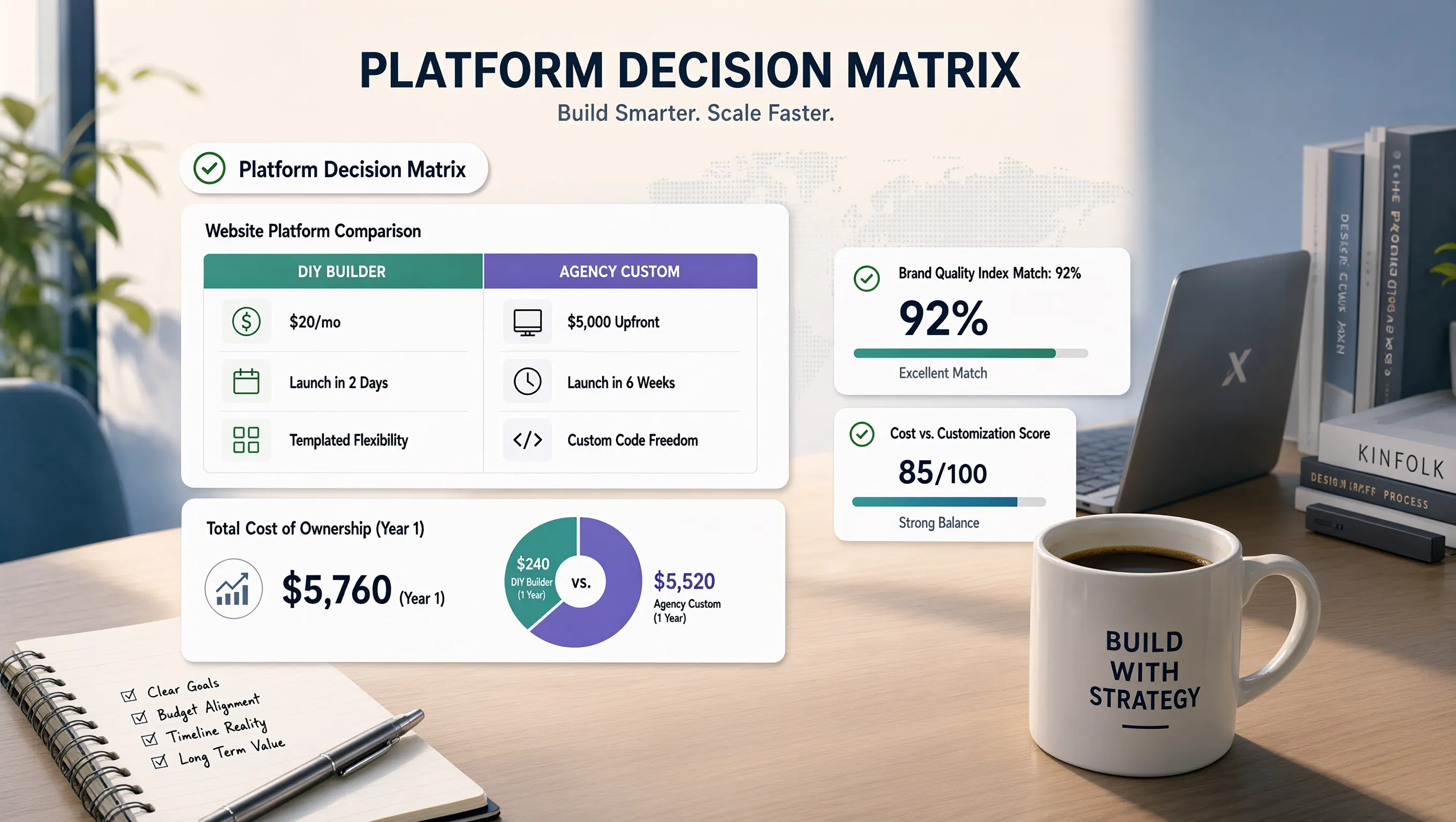
For the vast majority of commercial operations, modern builders deliver world-class design performance at a fraction of the cost. For a deeper comparison, read our guide on DIY website versus professional website options.
12. How to Turn an AI-Generated Website Into a Professional One
To turn an AI-generated layout into an elite, lead-generating storefront, follow this structured execution sequence:
Ready to Build a Professional Website in Minutes?: You don't have to hire expensive design agencies or spend weeks wrestling with complex code. Build your storefront on BoltWeb today—the all-in-one AI website builder for small business that generates localized copy, search-optimized architecture, and responsive layouts automatically, letting you launch a high-converting digital storefront in under 60 seconds!
10 FAQs: Can AI Build a Professional Website?
1. Can AI build a truly professional website, or will it look like a cheap template?
Here's the plain truth:
An AI website generator can build an elite, professional storefront—provided it structures real user intent instead of just slapping placeholder text onto a screen.
When visitors land on a page that uses generic slogans, mismatched visual spacing, or hidden call buttons, they bounce instantly. Building your digital presence with BoltWeb eliminates design guesswork. As an all-in-one AI website builder, BoltWeb generates high-converting sales copy, structures localized page layouts, configures search tags, and publishes lead-ready storefronts in seconds.
2. How does AI create a website design tailored to my specific industry?
When you describe your business in plain language, advanced tools go far beyond basic color picks.
The platform analyzes your market to construct a custom site architecture:
- Outcome-Driven Hero Section: Crafts a bold value proposition that addresses your local audience's primary headache.
- Structured Service Blocks: Generates dedicated sub-blocks detailing your trade offerings and service boundaries.
- Conversion Routing: Positions tap-to-call headers and quote forms where mobile users naturally scan.
Starting with an intelligent builder allows you to create a business website that reflects your authentic trade authority.
3. What details should I give the AI to make sure my site doesn't look like my competitors'?
If you feed an automated generator a single vague sentence, you will get a forgettable, generic site.
To stand out in local search, supply specific operational details during setup:
- Specific Service Offerings: List the exact repairs, consultations, or installations you handle.
- Geographic Coverage: Name the exact cities, zip codes, and neighborhoods you serve.
- Core Differentiators: Highlight upfront flat-rate pricing, 24/7 emergency dispatch, or active trade licenses.
- Primary Conversion Action: Specify your main call to action ("Tap to Call" or "Get an Instant Quote").
Providing concrete inputs ensures your small business website design stands out from local competition.
4. Can AI generate full multi-page websites or just single-page landing pages?
Cramming all your business details onto a single homepage creates visual chaos and confuses prospective buyers.
To capture high-intent search traffic, verify that your tool supports a multi-page site structure:
- Homepage: Captures attention, establishes local authority, and directs traffic toward specific subpages.
- Dedicated Service Pages: Focuses on specific trade offerings with location-targeted keywords.
- Trust & Credentials Page: Displays verified client reviews, license badges, and active insurance proof.
Choosing an AI website generator for small business that supports full multi-page architectures ensures every service gets its own search-optimized page (explore layout rules in our guide on business website pages).
5. Will an AI-generated website be optimized for mobile screens?
Over 70% of local service inquiries occur on mobile devices while buyers are seeking immediate solutions. If a page renders awkward layouts, overlapping text, or slow mobile loading times, you lose qualified leads instantly.
Audit an AI website builder across smartphone viewports:
- Thumb-Zone Usability: Tap-to-call buttons and quote links placed comfortably within easy thumb reach.
- Sub-2-Second Velocity: Compressed field imagery for instant loading over cellular data.
Prioritizing mobile responsiveness guarantees an effortless experience for every smartphone visitor.
6. Can AI write sales copy that sounds like a real business instead of robotic jargon?
Generic corporate buzzwords like "Unmatched Excellence and Quality" destroy commercial authority because they fail to communicate real value.
Refine generated text using concrete, verifiable facts:
- Generic Fluff: "We are the leading local contractor in town."
- Concrete Proof: "Over 450+ verified 5-star Google reviews and 15 years serving local homeowners."
Incorporate high-intent phrases that prospective clients use during intake calls to keep readers engaged and ready to hire your team. For more on copywriting, read our guide on writing landing page copy.
7. How does an AI website handle local SEO and Google indexing?
If your platform lacks built-in search engine optimization controls, your site will remain buried on page five of search results while competitors take all the local leads.
Partner with an SEO-friendly website builder that grants control over key technical settings:
- On-Page SEO Tags: Customizable page titles, H1/H2 heading hierarchies, meta descriptions, and image alt text.
- Clean URL Control: Create clean, keyword-rich subpage paths.
- Automated Technical Infrastructure: Built-in XML sitemap generation, structured local schema markup, and automatic Google indexing support.
8. How do I add forms, online booking, and payment processing to an AI website?
Discovering after launch that an essential business tool requires paying for expensive third-party software plugins is an annoying financial surprise.
Verify native operational tools directly inside your platform plan:
- Lead Capture: Native quote forms that send instant notifications straight to your email or phone.
- Online Scheduling: Automated booking features that let clients reserve calendar slots directly.
- Payment Gateways: Secure checkouts that process credit card deposits directly on the page.
9. What are the common hidden costs when using an AI website builder?
Beware of promotional pricing gimmicks. Software tools advertising low monthly rates often hide steep renewal price spikes, domain connection charges, and mandatory add-on fees for basic security.
Calculate your true total operational expenditure:
Selecting a platform with transparent small business website builder pricing protects your cash flow and guarantees full control over your digital assets. For more on pricing models, read our guide on free versus paid website builder plans.
10. What is the fastest path to launch an AI-built business website today?
Deploying a lead-generating digital storefront doesn't require hiring expensive agencies or spending weeks learning complex code.
Follow this simple execution sequence to launch your site:
- Provide Your Business Brief: Supply your core services, service radius, and primary conversion goal.
- Polish Brand Styling: Adjust colors, typography, and section blocks to match your identity.
- Refine Conversion Copy: Add verified customer reviews, clear starting prices, and time-bound guarantees.
- Audit Functional Workflows: Test quote forms, tap-to-call mobile headers, and local search tags.
- Publish Your Storefront: Connect your custom domain and launch your high-converting storefront on BoltWeb in under 60 seconds!