Most business owners sit down to build a website, open a blank document, and immediately freeze. They ask themselves: "What should I say about my company?"
Here's the mistake most websites make.
They turn their homepage into a resume. They talk about their founding year, their internal values, and their long list of technical features. But when a stressed customer lands on that page looking for a fast solution, they don't care about your company history. They care about their own problems.
Learning how to choose what your website should say isn't about writing clever slogans. It's about organizing your customer's real needs into a clear, persuasive layout that turns casual readers into paying clients.

How to Choose What Your Website Should Say (Start Here)
Starting with a blank page is intimidating. If you try to write all your website copy at once, you end up with messy, unfocused sentences.
Let's make it simpler.
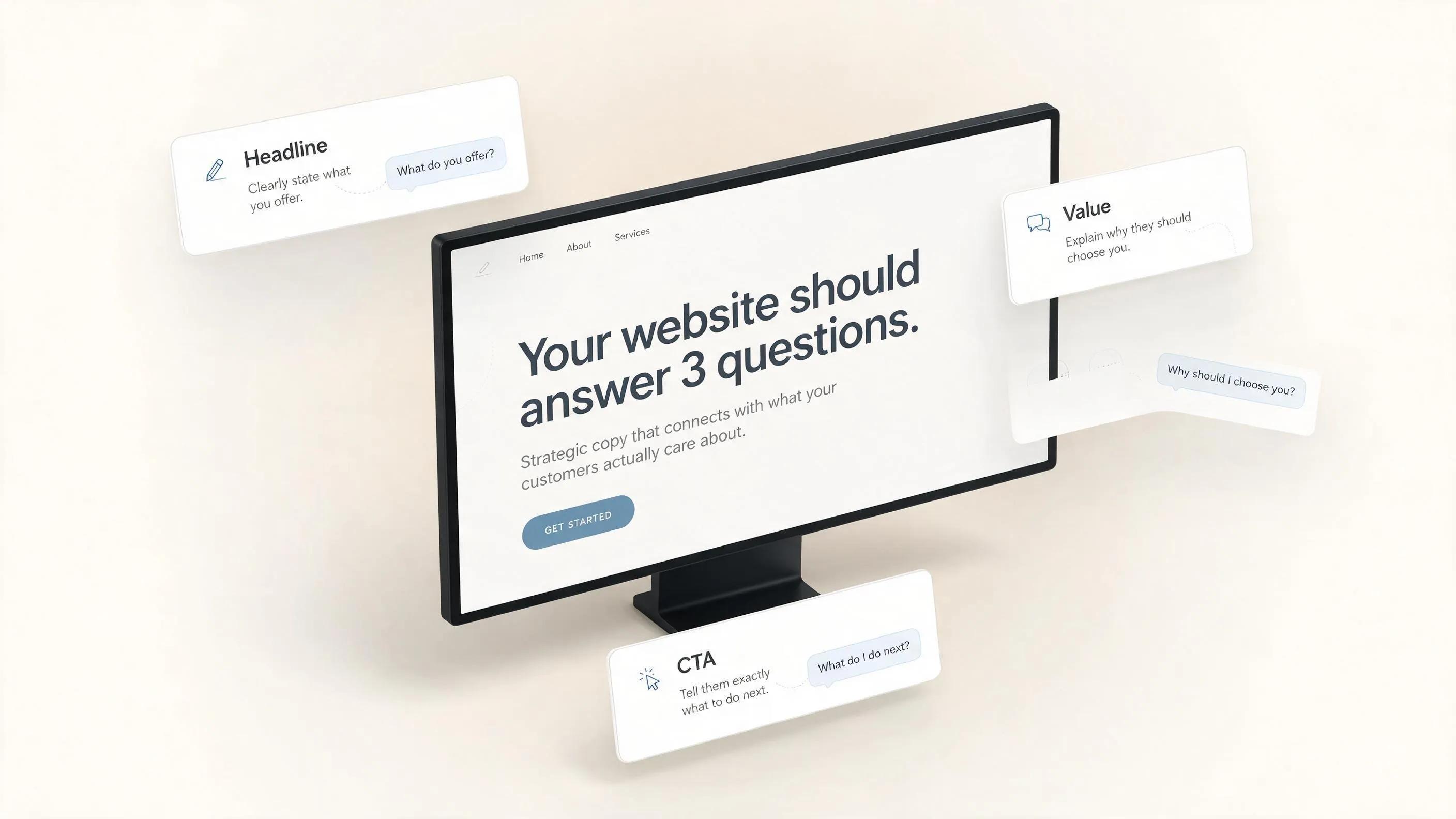
Instead of writing endless paragraphs, start by answering three foundational questions about your business:
THE 3-STEP MESSAGING ANCHOR
│
▼
[ THE PROBLEM ]
"What exact headache do you solve?"
[ THE OUTCOME ]
"What clear result do you deliver?"
[ THE ACTION ]
"What is the single next step to take?"
- The Specific Problem: What exact headache makes someone search for your service at 9:00 PM?
- The Clear Outcome: What does their life or business look like after you fix that problem?
- The Simple Action: What is the single easiest step they should take right now to get started?
Once you write down those three answers, your blank page vanishes. You now have the raw material for a high-converting page.
Stop Writing About Your Business. Start Writing for Your Customer
Think like your customer for a moment.
When someone opens your site, they are experiencing cognitive friction. They have a specific goal in mind—hiring a reliable contractor, fixing a broken pipe, or buying software that saves them hours of work.
If your hero banner reads "Delivering Unmatched Excellence Since 2010," you force their brain to work hard just to figure out what you actually sell.
[ INSIDE-OUT COPY (WEAK) ]
"We pride ourselves on top-tier roofing engineering and craft."
──► Focused on the company
[ CUSTOMER-FIRST COPY (STRONG) ]
"Get Your Leaking Roof Fixed Today. 100% Free On-Site Inspection."
──► Focused on the customer's problem
To write effective website copywriting, apply the Jobs-to-Be-Done (JTBD) framework. Ask yourself: "What job is the customer hiring my product or service to do?"
- Customers don't buy a drill; they buy a clean hole in the wall.
- Customers don't buy tax software; they buy peace of mind and protection from audits.
- Customers don't buy a website builder; they buy a reliable stream of new inquiries.
This changes everything. Shift your sentences from "We do X" to "You get Y."

What Should Someone Understand Within the First 5 Seconds?
Visitors scroll fast. According to initial visual processing models, people decide whether to stay on your domain or click back to Google search results in under five seconds.
If your main screen doesn't offer immediate visual hierarchy and clarity, readers walk away.
Here's what visitors are really looking for above the fold:
- The Primary Headline: A plain-language statement explaining your exact service and audience.
- The Supporting Subheadline: A brief sentence describing the tangible benefit or proof.
- The Call-to-Action (CTA): A direct, high-contrast button leading straight to the solution.
THE 5-SECOND HERO ARCHITECTURE
[HEADLINE]
Build a Customer-Ready Website Without Writing Code
[SUBHEADLINE]
Launch a high-converting site in minutes using BoltWeb's automated builder. Built for small businesses.
Avoid clever pun lines or vague corporate buzzwords. Plain, clear language beats creative writing every single time.

Find the Message Your Customers Are Already Looking For
Don't guess what your buyers want to hear. Use the exact words they already use when talking about their problems. This technique is called Voice of Customer (VoC) messaging.
When you use your market's exact vocabulary, visitors feel an immediate sense of familiarity. They stop scrolling and think: "This business understands me."
Here's how to gather real VoC copy in under an hour:
- Review Sites: Read your 4-star and 5-star Google or Trustpilot reviews. Look for recurring phrases about why people love your team.
- Negative Feedback Analysis: Read your competitors' 1-star reviews. Identify what frustrated their clients (e.g., "They never called me back," "Hidden surprise fees").
- Sales Conversations: Pay attention to the first sentence prospective clients say when they call your phone line.
VOICE OF CUSTOMER (VoC) MATRIX
│
▼
[ RAW CLIENT PHRASE ]
"Other companies never gave a clear quote"
[ MARKET HESITATION ]
Fear of hidden expenses or surprise invoices.
[ CONVERSION COPY OUTPUT ]
"Flat-rate pricing upfront. No hidden fees ever."
Now your homepage starts making sense because it reflects real human conversations.

Build Your Homepage Around Questions Instead of Features
A high-converting page shouldn't be a random pile of text boxes. It must follow a natural logical flow that guides the reader's eyes down the page.
To achieve continuous reading momentum (what legendary copywriter Joseph Sugarman called the Slippery Slope), structure your layout so every section answers a specific question in the reader's mind:
HOMEPAGE QUESTION FLOW
│
▼
[ SECTION 1: HERO ]
"What do you offer?"
Headline + Primary CTA
[ SECTION 2: PROOF ]
"Why should I trust you?"
Reviews + Client Badges
[ SECTION 3: FEATURES ]
"How does it work?"
3-Step Breakdown
- Header Section: "What do you offer and is it for me?"
- Trust Section: "Who else has used this with success?" (Show customer reviews and logos).
- Process Breakdown: "How easy is it to get started?" (Show a simple 1-2-3 step framework).
- Risk Reversal: "What if I'm not satisfied?" (Highlight money-back guarantees or clear terms).
- Final Action: "What should I do right now?" (Repeat your main lead form or phone link).
Applying Hick’s Law by reducing competing navigation choices ensures users aren't overwhelmed by too many options.

Write Website Copy That Sounds Human, Not Like Marketing
Don't write this yet.
If you catch yourself typing corporate phrases like "leveraging synergies" or "cutting-edge solutions," pause and delete them. Nobody speaks like that over coffee, and nobody likes reading it online.
Here's how to keep your tone authentic and conversational:
| Marketing Jargon (Avoid) | Human Copy (Use Instead) |
|---|---|
| "We utilize advanced spatial logistics algorithms." | "We find the fastest delivery route for your package." |
| "Synergistic enterprise management platforms." | "Software that helps your team stay organized." |
| "Seamless integration capabilities." | "Connects to your existing tools in two clicks." |
Write the way you talk to a real person standing in front of you. When copy feels natural, readers lower their guard and engage with your offer.

Turn Benefits Into Words People Can Picture
Features tell people what a product is. Benefits show people what a product does for them.
To write persuasive copy, translate abstract technical specifications into concrete outcomes visitors can picture visually in their minds.
FEATURE TO BENEFIT TRANSLATION
│
▼
[ FEATURE ]
"Includes 256-bit SSL encryption"
[ ADVANTAGE ]
"Keeps data safe from outside threats"
[ CONCRETE BENEFIT ]
"Your customer payment info stays 100% secure"
Apply the "So What?" test to every line of text on your page:
- Feature: "Our website builder loads pages under 1 second."
- So What? "Your pages open instantly on slow mobile connections."
- Concrete Outcome: "You never lose prospective buyers to annoying loading screens."
When readers can picture the exact personal benefit, choosing your business becomes an easy decision.

Choose Calls to Action That Feel Natural to Click
Generic button text like "Submit" or "Learn More" creates hesitation. Readers want to know exactly what happens after they click.
According to B.J. Fogg’s Behavior Model (B = MAP), taking action requires sufficient Motivation, high Ability (low effort), and a clear Prompt.
[ HIGH-FRICTION BUTTON COPY ]
[ SUBMIT ]
──► Vague, feels like work
[ LOW-FRICTION ACTION COPY ]
[ GET MY FREE QUOTE ]
──► Clear value + zero obligation
Upgrade your call-to-action text using value-focused verbs:
- Instead of "Submit": Use "Get My Free Inspection"
- Instead of "Contact Us": Use "Talk to a Specialist Today"
- Instead of "Register": Use "Create Your Account in 60 Seconds"
Making action triggers clear and benefit-driven reduces user anxiety and boosts click rates.

The Pages Every Business Should Write Differently
Yes. Each page on your domain has a distinct job to fulfill within your customer acquisition loop.
PAGE-SPECIFIC COPY GOALS
│
▼
[ SERVICES PAGE ]
Specific Deliverables
Clear Pricing Scope
Focused Intake Form
[ ABOUT PAGE ]
Founder Story & Mission
Community Credentials
Team Visual Proof
[ CONTACT PAGE ]
Reduced Friction
Instant Call Options
Short 3-Field Form
- Services Page: Focus on clear deliverables, expected timelines, transparent pricing ranges, and targeted intake forms.
- About Page: Tell a human story. Explain why you started the company, introduce your core team members with real photos, and state your commitment to your community.
- Contact Page: Keep text minimal. Provide click-to-call phone numbers, interactive map pins, business hours, and a short 3-field contact form.
Aligning each page's message with user intent delivers a smooth browsing experience across your entire domain.

Common Website Copy Mistakes That Lose Customers
Even great businesses lose sales due to simple, avoidable copywriting errors.
Watch out for these four conversion traps:
- The Wall of Text: Writing long, unbroken paragraphs. Break content up into 2-line sentences, bulleted lists, and bold headers.
- Passive Voice: Using indirect sentences like "Quality work is delivered by our staff" instead of active phrasing like "We deliver top-quality work every time."
- Hiding Prices: Refusing to give baseline pricing ranges. If users can't find pricing context, many will leave for a competitor who provides upfront estimates.
- Competing CTAs: Placing five different buttons leading to five different pages on the same viewport. Give users one primary path forward.
Eliminating these copy bottlenecks keeps readers engaged and scrolling down your sales funnel.

A Simple Website Copy Checklist Before You Publish
One final check before you publish.
Run your written draft through this 6-point evaluation checklist before pushing your pages live:
| Copy Evaluation Criteria | Verification Question | Check |
|---|---|---|
| 5-Second Clarity Test | Can a stranger read your top banner and explain what you do in 5 seconds? | [ ] |
| Customer Centricity | Do your sentences use "You" and "Your" more often than "We" and "Our"? | [ ] |
| Proof Validation | Are client testimonials and verified star ratings placed near your main buttons? | [ ] |
| Scannability | Are your sections broken up with clear subheadings, bullet lists, and short sentences? | [ ] |
| Low-Friction CTAs | Do your action buttons state a clear benefit rather than generic words like "Submit"? | [ ] |
| Grammar & Tone Check | Is your text free of complex jargon, passive phrasing, and spelling errors? | [ ] |
Once your draft passes all six checkpoints, your message is ready to capture inquiries.

Turn Your Website Message Into a Live Website With BoltWeb
Writing your message is only half the journey. Putting those words into a clean, mobile-responsive layout used to require hiring expensive agency coders or wrestling with complex web design tools for weeks.
With BoltWeb, you can turn your messaging into a customer-ready, high-converting website in minutes.
BOLTWEB CONTENT LAUNCH ENGINE
│
▼
[ AUTOMATED LAYOUTS ]
Pre-Formatted Frames
Drag-and-Drop Editing
[ CONVERSION SECTIONS ]
Optimized Hero Headlines
Built-In Lead Forms
[ MOBILE RESPONSIVENESS ]
Fluid Screen Scaling
Fast Load Speeds
Why growing businesses trust BoltWeb's AI website builder to launch their brand:
- Automated Layout Generation: Enter your business description, core services, and target location to generate structured, professional page layouts instantly.
- Pre-Formatted Conversion Blocks: Drag-and-drop hero sections, trust review cards, process grids, and intake forms engineered to convert traffic into leads.
- Native Mobile Responsiveness: Your written copy automatically scales and formats for smartphone, tablet, and desktop viewports seamlessly.
- Built-in SEO & Enterprise Hosting: Integrated meta tag management, clean heading hierarchies, and secure SSL hosting come standard.
Stop letting your business message sit hidden in a draft folder.
Turn your copy into an online client acquisition engine with BoltWeb today.

Frequently Asked Questions About How to Choose What Your Website Should Say
How do I figure out what my website should actually say?
Start by listening to your existing customers instead of writing from scratch. Review sales call notes, customer emails, support tickets, and online reviews. Identify the exact problems your buyers describe, the specific outcomes they want, and the hesitation keeping them from buying. Use those exact phrases—known as Voice of Customer (VoC) copy—to populate your page.
Should my website copy focus on my company or my customer?
Your copy should focus almost entirely on the customer. While it is tempting to detail your history, awards, and internal processes, visitors primarily care about their own goals. Structure your messaging around the customer's problem, framing your product or service as the reliable guide that helps them achieve their desired outcome.
What is the difference between writing features and writing benefits?
Features describe what your product or service actually is or does (e.g., "24/7 automated monitoring system"). Benefits explain what that feature achieves for the user (e.g., "Rest easy knowing your facility is completely protected overnight"). Lead with the benefit to capture interest, then back it up with features to justify the technical detail.
How do I write copy for a target audience I haven't defined yet?
Narrow your messaging to address your most profitable or ideal buyer profile first. Attempting to write website copy that appeals to everyone results in vague, generic statements that resonate with no one. Clearly name your primary target market in your hero section so your ideal visitors recognize themselves immediately.
How long should the copy on my homepage be?
Your copy should be long enough to overcome customer hesitation, but short enough to keep readers engaged. Short-form copy works best for low-cost, low-risk offers where decisions happen quickly. High-ticket services or complex B2B products require longer copy to address buying questions, build trust, and detail concrete outcomes.
How do I choose the tone of voice for my website text?
Base your tone of voice on your industry and audience expectations. A legal or financial consulting firm requires a professional, authoritative, and reassuring tone to build confidence. A direct-to-consumer brand or lifestyle product can adopt an energetic, conversational, or witty voice. Always prioritize clarity over cleverness.
How do I structure my page text so people actually read it?
Web visitors rarely read every word—they scan. Format your copy into easily digestible visual blocks:
- Use high-contrast headings (<h2>, <h3>) every 2–3 paragraphs.
- Keep body text paragraphs short (2–4 lines maximum).
- Highlight key lists using bullet points instead of long prose blocks.
- Bold high-priority phrases to guide scanning eyes toward main value points.
Where should I put call-to-action (CTA) copy, and what should it say?
Place call-to-action prompts above the fold in your top hero section, at the end of key feature breakdowns, and near the footer menu. Replace passive button copy like "Submit" or "Learn More" with specific outcome-based phrasing like "Schedule Your Free Inspection" or "View Pricing Options."
How do I know if my website copy is too complex or technical?
Run your draft through readability tools like the Hemingway Editor or Flesch-Kincaid scale, aiming for a 6th to 8th-grade reading level. If your text contains internal acronyms, industry buzzwords, or long compound sentences, simplify it. If a prospective client wouldn't say the phrase in a casual coffee conversation, remove it from your page.
How do I incorporate social proof into my messaging naturally?
Weave social proof directly into your core message claims instead of hiding it on a separate page. Place star ratings and short review quotes right next to your primary call-to-action buttons. Feature case study excerpts directly alongside your service listings to validate your promises with verified proof.
How often should I update or change my website content?
Audit and update your website messaging every six months, or whenever you introduce new services, pivot your primary target market, or notice a drop in conversion rates. Regular updates ensure your value proposition reflects current market demand and addresses new customer objections.
What is the fastest way to write messaging for a website without hiring a copywriter?
Using an automated platform like BoltWeb lets you generate structured, high-converting website messaging instantly. BoltWeb transforms basic details about your business, target audience, and primary services into pre-structured hero headers, value propositions, service breakdowns, and clear call-to-action prompts out of the box.